Guide 2: URL images
With this approach each dataset row stores an https link to the image. The dataset stays small, but the link has to work when the prompt runs.
What you’ll build: a receipts-urls dataset that points at images hosted on this site, and a Playground run over it.
URL requirements
| Rule | ✅ Works | ❌ Sent as text |
|---|---|---|
Must use https:// |
https://cdn.example.com/r/123.png |
gs://bucket/r/123.png, s3://bucket/r/123.png |
The path must end in .jpg, .jpeg, .png, .gif or .webp |
https://bucket.s3.amazonaws.com/r/1.jpg?X-Amz-Signature=... |
https://cdn.example.com/img/12345 |
| Must be publicly reachable | Public CDN, presigned URL | VPN-only host, private IP |
| Must still be valid at run time | Presigned URL with a long enough expiry | An expired presigned URL |
Step 1: Create the dataset
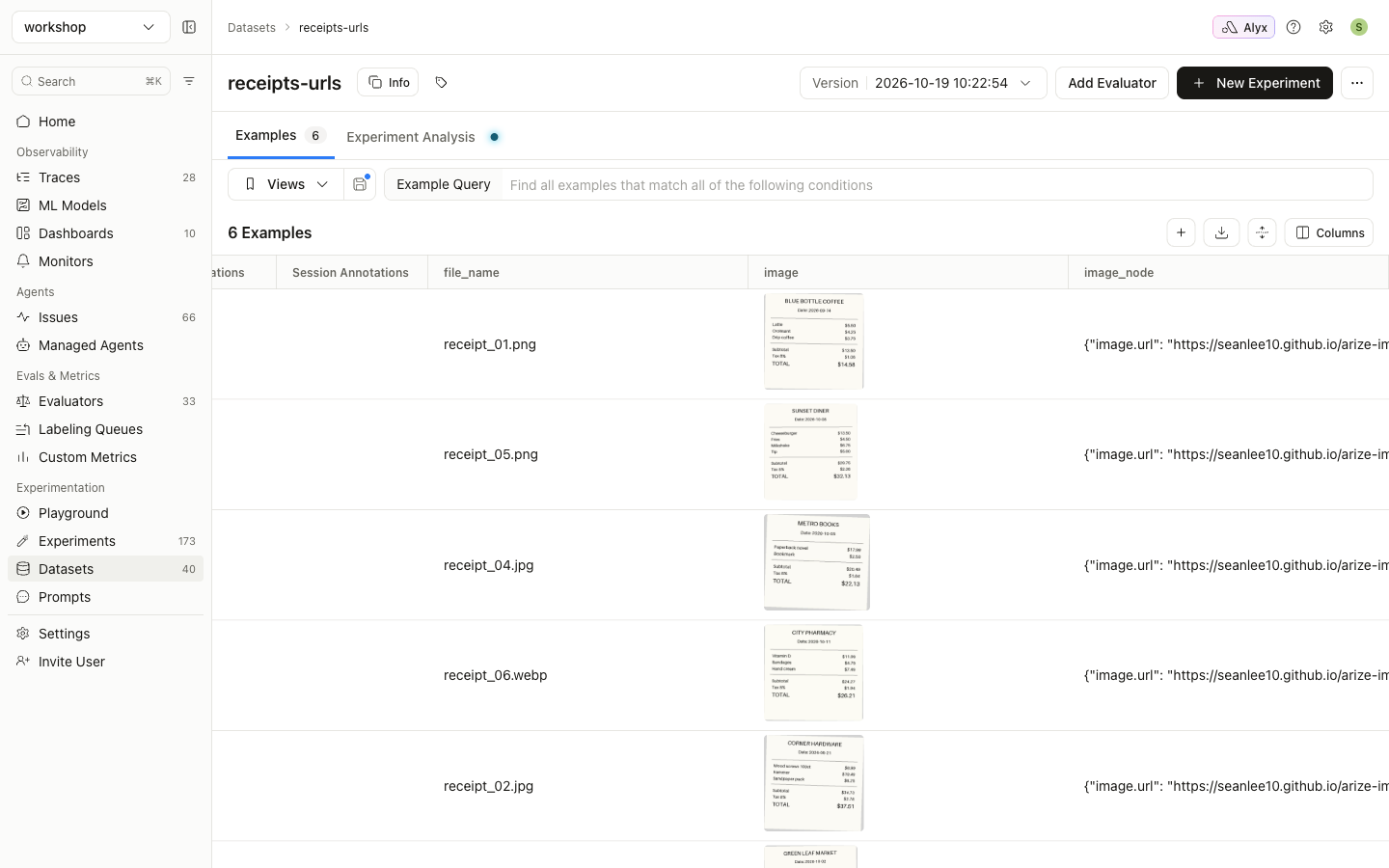
The full script is examples/02_create_url_dataset.py. It points at the sample receipts on this repo’s Pages site by default. Use --base-url to point it at your own host.
import json

BASE = "https://seanlee10.github.io/arize-image-inference/examples/images"

examples = []
for row in ground_truth:
    url = f"{BASE}/{row['file_name']}"
    examples.append({
        "image": url,                                    # used by the Playground and experiments
        "image_node": json.dumps({"image.url": url}),    # used by evaluators (guide 3)
        "file_name": row["file_name"],
        "expected_merchant": row["merchant"],
        "expected_date": row["date"],
        "expected_total": row["total"],
    })

client.datasets.create(name="receipts-urls", space=os.environ["ARIZE_SPACE_ID"], examples=examples)
Arize fetches the URLs to render thumbnails in the dataset view:
Step 2: Run it in the Playground
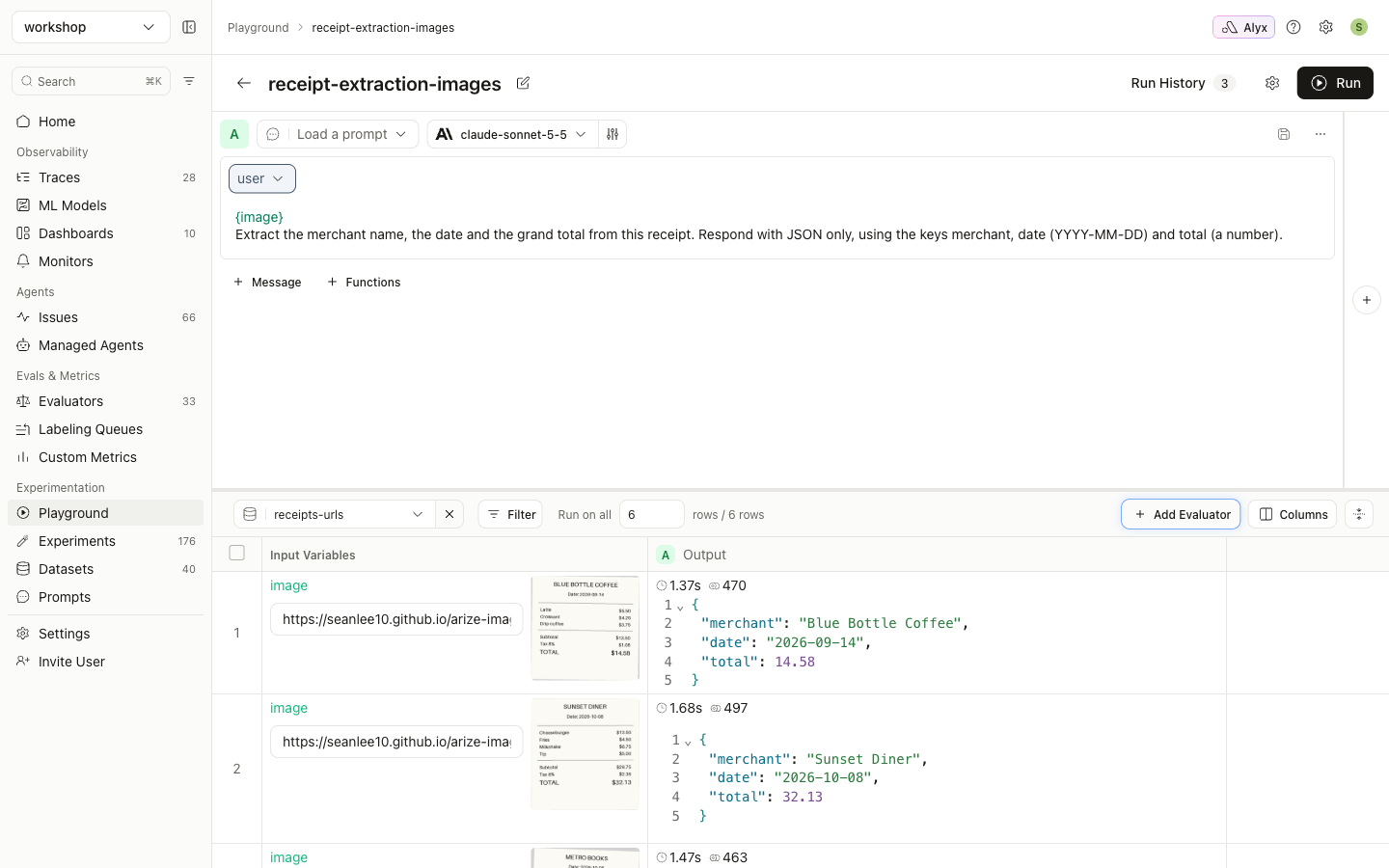
These are the same steps as guide 1, step 3. Select receipts-urls instead and click Run:
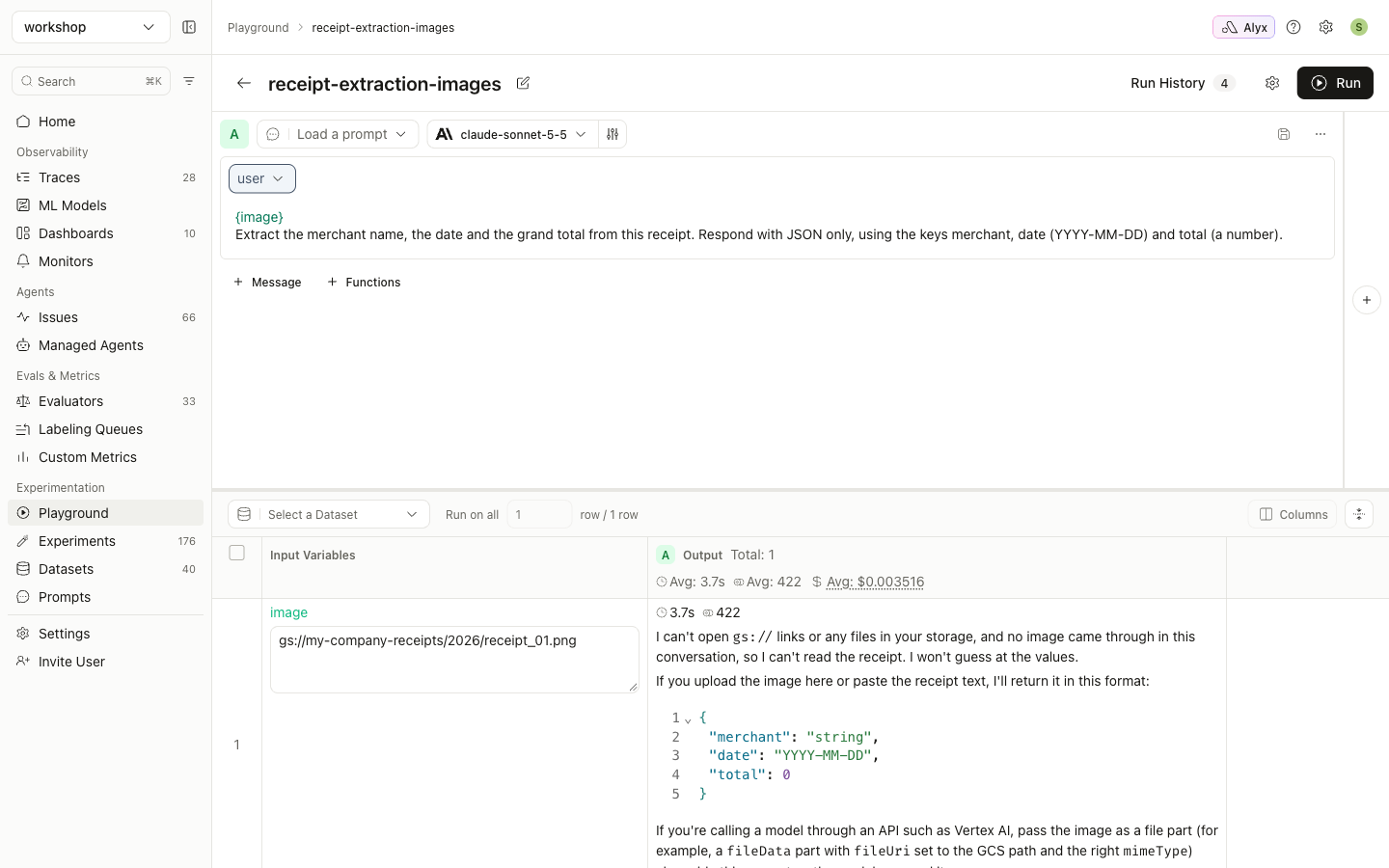
gs:// and s3:// URIs are not images
Arize does not sign bucket URIs in the Playground or in experiments, so the model receives the literal text. In this run the image variable was set to gs://my-company-receipts/2026/receipt_01.png. The prompt still worked, but the model only received the string:
Convert the URIs first, using either of these:
- Presigned https URLs (walkthrough below). This is quick, but the URLs expire, so re-sign them for later re-runs.
- Base64 (guide 1). Use this when re-runs need to keep working.
Walkthrough: images in a private GCS bucket
This was run end to end against a private bucket (public access prevention enforced). The receipts were uploaded under gs://<bucket>/receipts/.
Step 1: One-time GCP setup: a signing service account
GCS V4 signed URLs must be signed by a service account. User credentials from gcloud auth application-default login can read objects but cannot sign. Rather than downloading a key file, create a service account and sign by impersonating it:
PROJECT=my-project
BUCKET=my-receipts-bucket
SA=arize-url-signer@$PROJECT.iam.gserviceaccount.com

# Impersonation-based signing goes through this API
gcloud services enable iamcredentials.googleapis.com --project $PROJECT

gcloud iam service-accounts create arize-url-signer --project $PROJECT

# The service account can only read the bucket
gcloud storage buckets add-iam-policy-binding gs://$BUCKET \
  --member serviceAccount:$SA --role roles/storage.objectViewer

# You (or your CI identity) can sign as the service account
gcloud iam service-accounts add-iam-policy-binding $SA --project $PROJECT \
  --member user:you@example.com --role roles/iam.serviceAccountTokenCreator
A signed URL only works if the signer can read the object. The objectViewer grant is what makes the link valid.
Step 2: Sign and create the dataset
examples/sign_urls.py signs through impersonation:
import google.auth
from google.auth import impersonated_credentials
from google.cloud import storage
from datetime import timedelta

def sign_gcs(uri: str, seconds: int = 7 * 24 * 3600, signer: str | None = None) -> str:
    credentials = None
    if signer:
        source, _ = google.auth.default()
        credentials = impersonated_credentials.Credentials(
            source_credentials=source,
            target_principal=signer,
            target_scopes=["https://www.googleapis.com/auth/cloud-platform"],
        )
    bucket, blob = uri.removeprefix("gs://").split("/", 1)
    return (storage.Client(credentials=credentials).bucket(bucket).blob(blob)
            .generate_signed_url(version="v4", expiration=timedelta(seconds=seconds),
                                 method="GET", credentials=credentials))
examples/05_create_gcs_dataset.py keeps the original URI for reference and puts the signed URL in image:
examples.append({
    "gcs_uri": gcs_uri,                                  # reference only: sent as plain text
    "image": sign_gcs(gcs_uri, SEVEN_DAYS, signer),      # signed https URL: sent as an image
    "image_node": json.dumps({"image.url": url}),        # for evaluators (guide 3)
    ...
})
$ python 05_create_gcs_dataset.py --bucket my-receipts-bucket --prefix receipts/ \
    --signer arize-url-signer@my-project.iam.gserviceaccount.com
Created dataset 'receipts-gcs' (RGF0YXNldDozNzA2NTQ6S3JIag==) with 6 examples
URLs expire in 168 hours; re-run this script to re-sign them.
The row detail view shows the signed URL with the image rendered from it:
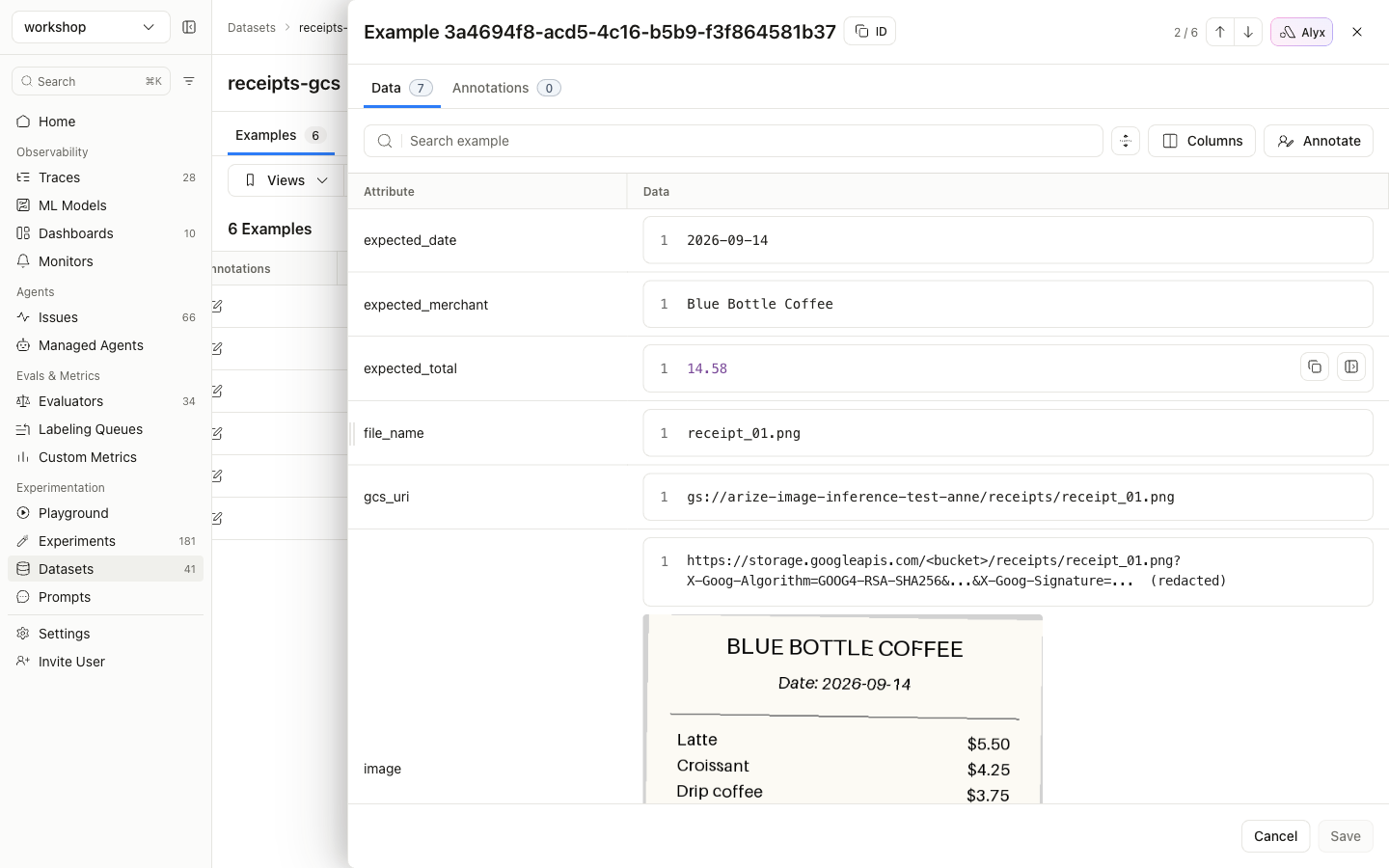
The examples table shows “Unable to load image” for these rows. This is a display limit only: the table cuts cell values to 200 characters, and a V4 signed URL is about 800. The row detail view, the Playground, experiments and evaluators all get the full URL.
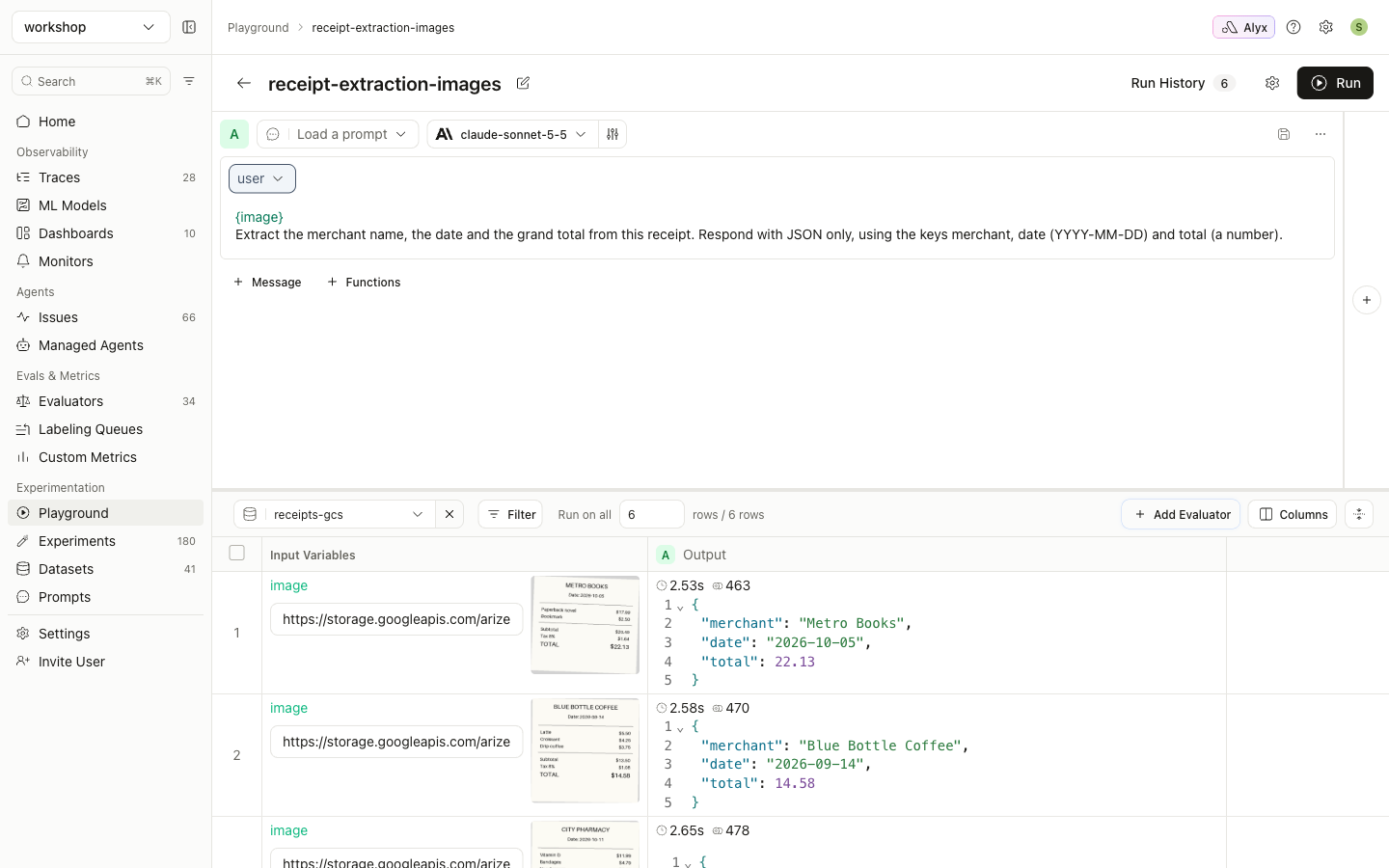
Step 3: Run it: signed URL vs raw gs://
{image} (the signed URL): the model reads every receipt from the private bucket.
{gcs_uri} (the raw gs:// URI), same dataset and same bucket: the model gets text only.
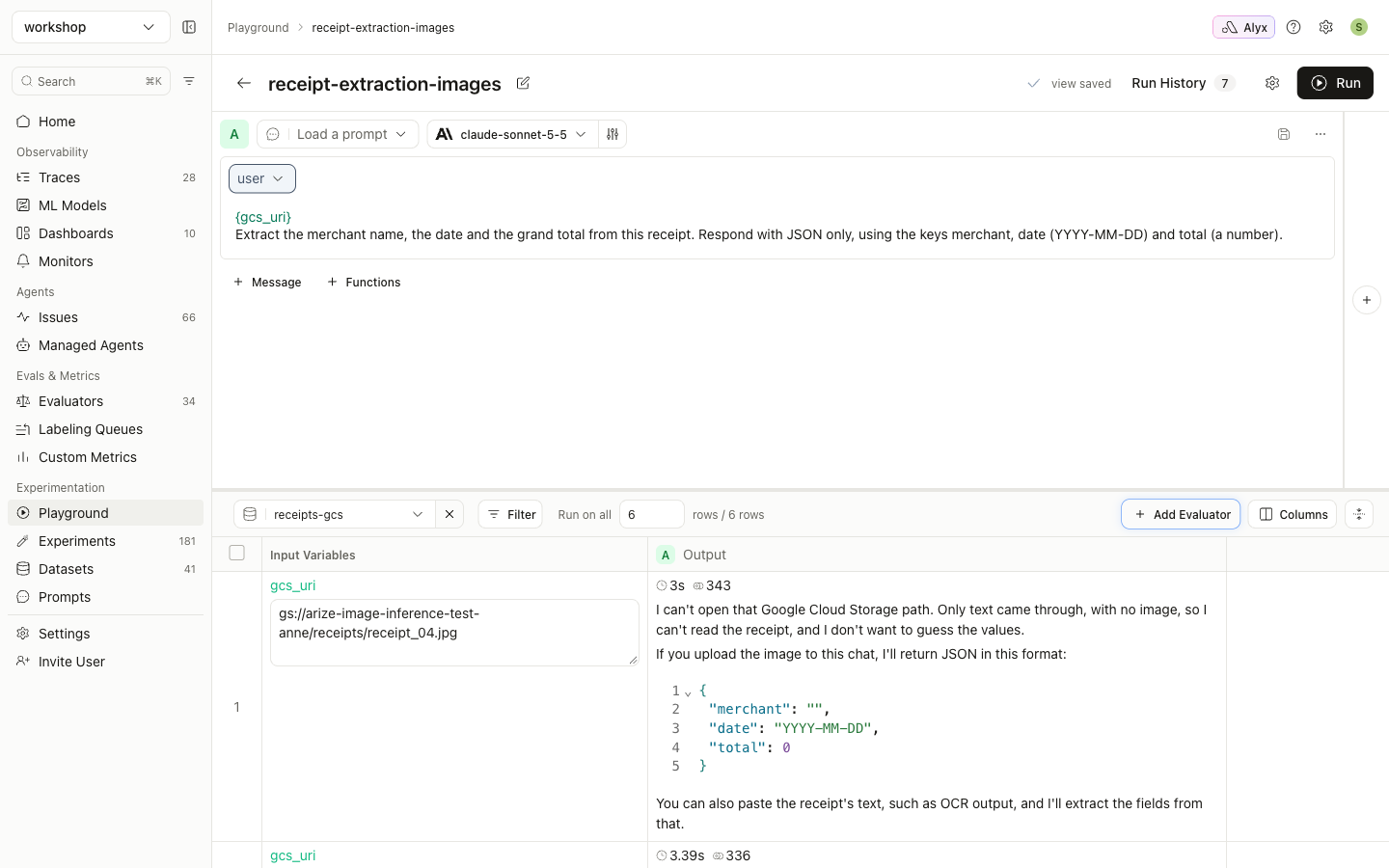
Results on this dataset:
| Path | Result |
|---|---|
Playground, {image} |
6/6 correct |
Playground, {gcs_uri} |
0/6. The model reports it received only text |
| Server-side experiment (guide 4) | total, merchant and date all 6/6 |
Image evaluator mapped to image_node (guide 3) |
6/6 correct |
Expiry
V4 signed URLs last at most 7 days. After that, re-runs fail with 400/403 errors from the provider. Re-run 05_create_gcs_dataset.py to create a fresh dataset, or use base64 if the dataset must stay usable.
S3
import boto3

def sign_s3(uri: str, seconds: int = 7 * 24 * 3600) -> str:
    bucket, key = uri.removeprefix("s3://").split("/", 1)
    return boto3.client("s3").generate_presigned_url(
        "get_object", Params={"Bucket": bucket, "Key": key}, ExpiresIn=seconds)
S3 URLs signed with STS or SSO session credentials expire when that session does, which can be well before the 7 days you asked for. Sign with long-lived credentials if you need the full 7 days.
Both signers keep the object key, including its .png/.jpg extension, in the URL path, so the extension rule still holds.
Provider notes
- OpenAI, Anthropic, Gemini/Vertex, and Bedrock with bearer-token auth accept https image URLs.
- Bedrock with IAM or access-key auth running a Claude model accepts only base64 PNG or JPEG. Use guide 1 there.
- Azure OpenAI and other OpenAI-compatible endpoints fetch the URL themselves. The host must allow the provider’s servers to download it.