Guide 4: Image experiments from code
There are two ways to run an image dataset through a model from Python:
| A. Server-side | B. Local task | |
|---|---|---|
| Who calls the LLM | Arize, through an AI integration in your space | Your Python process |
| Provider key needed locally | No | Yes |
| How the image reaches the model | `` in the prompt, the same as in the Playground | You build the provider’s image message yourself |
| Best for | A single prompt (+ model) to compare | Multi-step tasks, pre-processing, tools |
| Script | 03_run_experiment_server_side.py |
04_run_experiment_local.py |
Both scripts score the output against ground truth with the same helpers in scoring.py. The helpers strip any ```json fences, because models sometimes wrap their JSON answers in them.
Option A: Server-side through an AI integration
This creates a RUN_EXPERIMENT task, triggers it, and waits for it to finish. Arize fills `` from each row and sends the value as an image, exactly as the Playground does.
from arize import ArizeClient

client = ArizeClient(api_key=os.environ["ARIZE_API_KEY"])
space = os.environ["ARIZE_SPACE_ID"]

integration = client.ai_integrations.list(space=space, name="Anthropic 1").ai_integrations[0]

task = client.tasks.create_run_experiment_task(
    name="receipts-urls-claude",
    dataset="receipts-urls",
    space=space,
    run_configuration={
        "experiment_type": "LLM_GENERATION",
        "ai_integration_id": integration.id,
        "model_name": "claude-sonnet-5-5",
        "input_variable_format": "MUSTACHE",       # ; use F_STRING for {image}
        "messages": [{"role": "USER", "content": PROMPT}],  # PROMPT starts with "\n"
    },
)
run = client.tasks.trigger_run(task=task.id, experiment_name="claude-sonnet-5-5 (server-side)")
run = client.tasks.wait_for_run(run_id=run.id)
$ python 03_run_experiment_server_side.py --dataset receipts-urls --integration "Anthropic 1" --model claude-sonnet-5-5
Run TaskRunStatus.COMPLETED: 6 succeeded, 0 failed
   total correct: 6/6
merchant correct: 6/6
    date correct: 6/6
The same flow with the ax CLI:
ax tasks create-run-experiment --name receipts-urls-claude --dataset receipts-urls --space $ARIZE_SPACE_ID \
  --run-configuration '{"experiment_type": "LLM_GENERATION", "ai_integration_id": "<ID>",
    "model_name": "claude-sonnet-5-5", "input_variable_format": "MUSTACHE",
    "messages": [{"role": "USER", "content": "\nExtract the merchant name, ..."}]}'
ax tasks trigger-run <TASK_ID> --experiment-name "claude-sonnet-5-5 (cli)"
ax tasks wait-for-run <RUN_ID>
Option B: Local task with code evaluators
client.experiments.run() downloads the dataset, calls your task for each row, runs your evaluators, and uploads the results as an experiment. The task builds the provider’s own image message. A data URI and an https URL need different source types:
import re
import anthropic

DATA_URI = re.compile(r"^data:(image/[a-z]+);base64,(.*)$", re.DOTALL)
claude = anthropic.Anthropic()

def image_block(value: str) -> dict:
    """Build an Anthropic image block from a data URI or an https URL."""
    if m := DATA_URI.match(value):
        return {"type": "image", "source": {"type": "base64", "media_type": m[1], "data": m[2]}}
    return {"type": "image", "source": {"type": "url", "url": value}}

def task(dataset_row) -> str:
    msg = claude.messages.create(
        model="claude-sonnet-5-5",
        max_tokens=300,
        messages=[{"role": "user", "content": [image_block(dataset_row["image"]),
                                               {"type": "text", "text": PROMPT}]}],
    )
    return msg.content[0].text
Evaluators receive arguments by parameter name (output, dataset_row, input, metadata, …) and return an EvaluationResult:
from arize.experiments import EvaluationResult
from scoring import parse_output, total_correct

def total_evaluator(output, dataset_row) -> EvaluationResult:
    ok = total_correct(output, dataset_row)
    return EvaluationResult(
        score=float(ok),
        label="correct" if ok else "incorrect",
        explanation=f"expected {dataset_row['expected_total']}, got {parse_output(output).get('total')}",
    )

experiment, df = client.experiments.run(
    name="claude-sonnet-5-5 (local task)",
    dataset="receipts-base64",
    space=os.environ["ARIZE_SPACE_ID"],
    task=task,
    evaluators=[total_evaluator, merchant_evaluator, date_evaluator],
)
export ANTHROPIC_API_KEY=...
python 04_run_experiment_local.py --dataset receipts-base64 --dry-run   # 3 rows, nothing uploaded
python 04_run_experiment_local.py --dataset receipts-base64
Give each evaluator its own top-level function. The SDK requires unique evaluator names, and functions generated by a shared wrapper end up with the same name, which fails with Two evaluators have the same name.
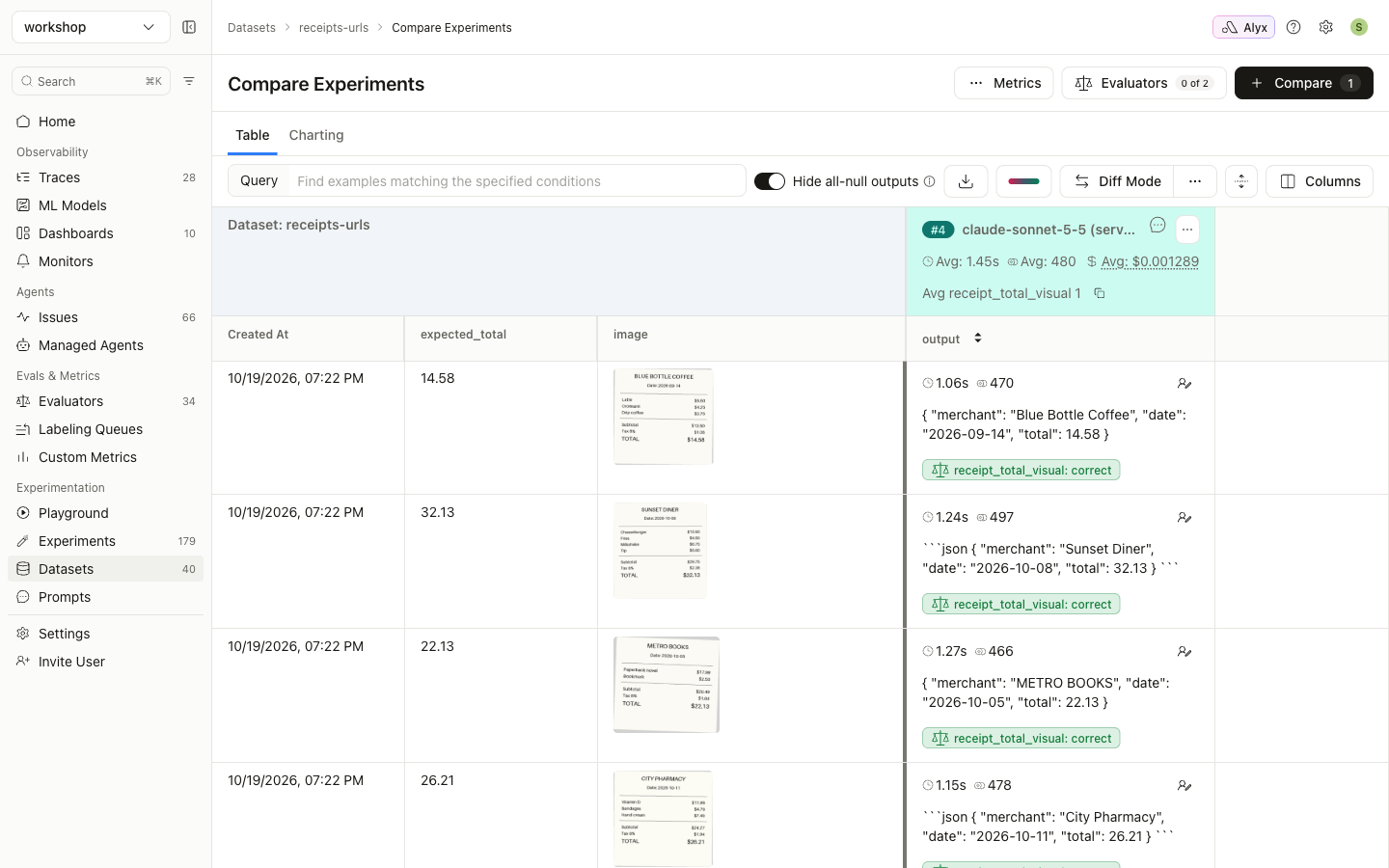
Comparing runs
Every run, whether from the Playground, Option A or Option B, appears under Datasets → (dataset) → Experiment Analysis. Select runs and click Compare to see them side by side, with images, outputs and eval labels: